LDAP Server 的基本操作

搜尋
-x:採用簡易認證
-b:指定搜尋起點
uid=:指定查詢條件

列出 ou=Teacher 的所有使用者[@more@]
# /usr/bin/ldapsearch -x -b “ou=Teacher,dc=ldap,dc=tces.ilc.edu.tw” uid=*
# extended LDIF
#
# LDAPv3
# base <ou=Teacher,dc=ldap,dc=tces.ilc.edu.tw> with scope subtree
# filter: uid=*
# requesting: ALL
#

# t850008, Teacher, ldap.tces.ilc.edu.tw
dn: uid=t850008,ou=Teacher,dc=ldap,dc=tces.ilc.edu.tw
uid: t850008
cn:: 5p6X5pit5ZCN
objectClass: account
objectClass: posixAccount
objectClass: top
userPassword:: e2
loginShell: /bin/bash
uidNumber: 953
gidNumber: 500
homeDirectory: /home/t850008

# search result
search: 2
result: 0 Success

# numResponses: 2
# numEntries: 1

列出單一使用者
# /usr/bin/ldapsearch -x -b “ou=Student,dc=ldap,dc=tces.ilc.edu.tw” uid=s0990001
# extended LDIF
#
# LDAPv3
# base <ou=Student,dc=ldap,dc=tces.ilc.edu.tw> with scope subtree
# filter: uid=s0990001
# requesting: ALL
#

# s0990001, Student, ldap.tces.ilc.edu.tw
dn: uid=s0990001,ou=Student,dc=ldap,dc=tces.ilc.edu.tw
uid: s0990001
cn:: 5Zub5oSbMTLnlLfmnpfls7vnkYs=
objectClass: account
objectClass: posixAccount
objectClass: top
userPassword:: e2
loginShell: /sbin/nologin
uidNumber: 1390
gidNumber: 505
homeDirectory: /home/s0990/s0990001

# search result
search: 2
result: 0 Success

# numResponses: 2
# numEntries: 1

刪除使用者
刪除 s0990001 使用者
# /usr/bin/ldapdelete -D “cn=Manager,dc=ldap,dc=tces.ilc.edu.tw” -W “uid=s0990001,ou=Student,dc=ldap,dc=tces.ilc.edu.tw”

更改密碼
改變使用者密碼,將 s0980005 的使用者密碼改成 123456
# /usr/bin/ldappasswd -s 123456 -D “cn=Manager,dc=ldap,dc=tces.ilc.edu.tw” -W -x “uid=s0980005,ou=Student,dc=ldap,dc=tces.ilc.edu.tw”

原本的使用者密碼
# /usr/bin/ldapsearch -x -b “ou=Student,dc=ldap,dc=tces.ilc.edu.tw” uid=s0980005 | grep userPassword
userPassword:: e2NyeXB0fSQ2JGJWVnYyOUZnaHUvJFNzaTBnMmg5VEhXakd3TWI0YWZIelVpc3B

改變後的使用者密碼
# /usr/bin/ldapsearch -x -b “ou=Student,dc=ldap,dc=tces.ilc.edu.tw” uid=s0980005 | grep userPassword
userPassword:: e1NTSEF9Y0U4Q3o1b0JYV1hTbFBpQnpJWEhiaTBzSUY5L1U0UFo=
匯入 LDIF 格式檔的方式

匯入 LDIF 格式的方式,可以使用 ldapadd 和 slapadd 這二種方式。
1. 採用 slapadd 的方式
# /usr/sbin/slapadd -l /root/ldif/s0980.ldif

-l 後面接的是 ldif 檔的位置[@more@]2. 採用 ldapadd 的方式
# /usr/bin/ldapadd -x -D “cn=Manager,dc=ldap,dc=tces.ilc.edu.tw” -W -f /root/ldif/s0980.passwd.ldif

-x:使用簡易認證來存取資料庫,不採用 SASL 認證
-f:指定要加入物件的資料庫設定檔
-D:指定在 /etc/openldap/slapd.conf 設定檔中,rootdn 項目所設定的 LDAP 伺服器管理者的 DN
-W:指定採詢問方式要求輸入 /etc/openldap/slapd.conf 設定檔中,rootpw 項目所設定的 rootdn 密碼,也可以直接指定 -w password

另外一個差別,slapadd 的方式,執行時要先把 LDAP Server 關閉,匯入完畢後,要更改權限,再啟動 LDAP Server
# service slapd stop
# /usr/sbin/slapadd -l /root/ldif/s0980.ldif
# chown -R ldap:ldap /var/lib/ldap
# service slapd start

而 ldapadd 則不用做上面的處理

匯入 LDIF 格式檔時出現 ldap_bind: Invalid credentials (49) 的錯誤訊息

之前在匯入 LDIF 格式檔時,都是使用 slapadd 的方式,後來改用 ldapadd 的方式,但却一直出現 ldap_bind: Invalid credentials (49) 的錯誤訊息。
# ldapadd -x -D “cn=Manager,dc=ldap,dc=tces.ilc.edu.tw” -W -f /root/ldif/s0980.passwd.ldif
Enter LDAP Password:
ldap_bind: Invalid credentials (49)

在網路上搜尋了一下,有人說是密碼打錯了,可是我確認沒有打錯,重新設定密碼,卻還是一樣。[@more@]後來在這裡找到答案
原來是我在 /etc/openldap/slapd.conf 中關於 rootpw 的設定有錯誤
# vim /etc/openldap/slapd.conf
# rootpw                {crypt}ijFYNcSNctBYg
 rootpw  {SSHA}x

rootpw 前面多了一個空格,清除之後,就正常了!

解決 LDIF 格式檔中有中文無法匯入的問題

經過 utf8 轉換過的 LDIF 格式檔,在匯入時會出現下面的錯誤的訊息
# slapadd -l /root/ldif/t850008.ldif
The first database does not allow slapadd; using the first available one (2)
str2entry: invalid value for attributeType gecos #0 (syntax 1.3.6.1.4.1.1466.115.121.1.26)
slapadd: could not parse entry (line=1)
_#################### 100.00% eta   none elapsed            none fast!
Closing DB…

看起來似乎是 gecos 的問題[@more@]在網路上搜尋了一下,似乎預設的 LDAP schema 在 gecos 的部分不支援中文
解決方法:
1. 先備份原檔 /etc/openldap/schema/nis.schema
# cp /etc/openldap/schema/nis.schema /etc/openldap/schema/nis.schema.bak

2. 修改設定檔 /etc/openldap/schema/nis.schema
# vim /etc/openldap/schema/nis.schema

attributetype ( 1.3.6.1.1.1.1.2 NAME ‘gecos’
        DESC ‘The GECOS field; the common name’
        EQUALITY caseIgnoreIA5Match
        SUBSTR caseIgnoreIA5SubstringsMatch
        SYNTAX 1.3.6.1.4.1.1466.115.121.1.26 SINGLE-VALUE )
修改成
attributetype ( 1.3.6.1.1.1.1.2 NAME ‘gecos’
        DESC ‘The GECOS field; the common name’
        EQUALITY caseIgnoreMatch
        SUBSTR caseIgnoreSubstringsMatch
        SYNTAX 1.3.6.1.4.1.1466.115.121.1.15 SINGLE-VALUE )

3. 重新匯入
# slapadd -l /root/ldif/t850008.ldif
The first database does not allow slapadd; using the first available one (2)
_#################### 100.00% eta   none elapsed            none fast!
Closing DB…

4. 如果還是不行的話,就只要把 LDIF 中的 gecos 那一行刪除即可!

LDIF 格式檔中文亂碼的問題

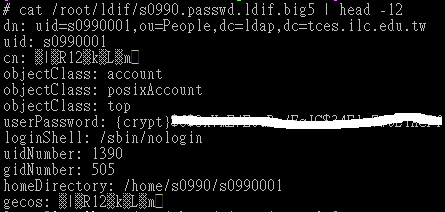
使用 migrationtools 工具來產生 LDIF 格式檔時,如果原來的帳號檔含有中文資料時,匯出時會變成亂碼
# cat /root/ldif/s0990.passwd
s0990001:x:1390:505:四愛12林○瑋:/home/s0990/s0990001:/sbin/nologin
s0990002:x:1391:505:四愛13林○豪:/home/s0990/s0990002:/sbin/nologin

# cat /root/ldif/s0990.passwd.ldif.big5 | head -12
[@more@]目前想到的解決方式
1. 先轉換成 big5 格式
# piconv -f utf8 -t big5 /root/ldif/s0990.passwd > /root/ldif/s0990.passwd.big5

2.  利用 migrationtools 進行轉換
# ./migrate_passwd.pl /root/ldif/s0090.passwd > /root/ldif/s0990.ldif.big5

3. 再轉換成 uft8 格式
# piconv -f big5 -t utf8 /root/ldif/s0990.ldif.big5 > /root/ldif/s0990.ldif

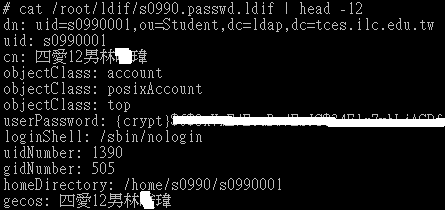
4. 檢視成果
# cat /root/ldif/s0990.passwd.ldif | head -12

使用 migrationtools 工具來產生 LDIF 格式檔

因為 LDIF 格式有一定的格式,如果完全使用手動來建立,是一件很累的工作,尤其是要處理的帳號很多時,這時可以利用 migrationtools 工具來協助產生 LDIF 格式檔,再視情況做修改。
1. 安裝 migrationtools 工具
# yum install migrationtools
安裝完成之後,可以在 /usr/share/migrationtools 目錄下找到很多以 .sh .pl 的程序檔
[root@localhost:/usr/share/migrationtools]
# ls
migrate_aliases.pl* migrate_all_nis_online.sh* migrate_all_online.sh* migrate_fstab.pl* migrate_netgroup_byuser.pl* migrate_profile.pl* migrate_slapd_conf.pl*
migrate_all_netinfo_offline.sh* migrate_all_nisplus_offline.sh* migrate_automount.pl* migrate_group.pl* migrate_netgroup.pl* migrate_protocols.pl*
migrate_all_netinfo_online.sh* migrate_all_nisplus_online.sh* migrate_base.pl* migrate_hosts.pl* migrate_networks.pl* migrate_rpc.pl*
migrate_all_nis_offline.sh* migrate_all_offline.sh* migrate_common.ph migrate_netgroup_byhost.pl* migrate_passwd.pl* migrate_services.pl* [@more@]2. 修改 /usr/share/migrationtools/migrate_common.ph
# vim /usr/share/migrationtools/migrate_common.ph
修改下面的值
# Default DNS domain
$DEFAULT_MAIL_DOMAIN = ” ilc.edu.tw “;

# Default base
$DEFAULT_BASE = ” dc=ldap,dc=tces.ilc.edu.tw “;

$EXTENDED_SCHEMA = 1;

3. 建立存放 ldif 檔案的目錄
# mkdir /root/ldif

4. 從系統帳號中取出要的資料
# grep t850008 /etc/passwd > /root/ldif/t850008.passwd
# grep ^s0990 /etc/passwd | sort > /root/s0990.passwd
# cat /root/ldif/s0990.passwd | head -2
s0990001:x:1390:505:四愛12林○瑋:/home/s0990/s0990001:/sbin/nologin
s0990002:x:1391:505:四愛13林○豪:/home/s0990/s0990002:/sbin/nologin

5. 從系統群組中取出要的資料
# egrep ‘teacher|s0990’ /etc/group > /root/ldif/group
# cat /root/ldif/group
teacher:x:500:
s0990:x:505:

6. 使用 migrationtools 工具
# cd /usr/share/migrationtools
# ./migrate_base.pl > /root/ldif/base.ldif
# ./migrate_passwd.pl /root/ldif/t850008.passwd > /root/ldif/t850008.ldif
# ./migrate_passwd.pl /root/ldif/s0090.passwd > /root/ldif/s0990.ldif
# ./migrate_group.pl /root/ldif/group > /root/ldif/group.ldif

7. 開始匯入
# service slapd stop
# slapadd -l /root/ldif/base.ldif
The first database does not allow slapadd; using the first available one (2)
_#################### 100.00% eta   none elapsed            none fast!
Closing DB…
# slapadd -l /root/ldif/t850008.ldif
# slapadd -l /root/ldif/s0990.ldif
# slapadd -l /root/ldif/group.ldif

8. 啟動 LDAP Server
# chown -R ldap:ldap /var/lib/ldap
# service slapd start

LDIF – LDAP Server 格式檔

LDIF 是 LDAP Data Interchange Format 的縮寫,是 LDAP Server 明文的格式檔。
底下是一個例子
#存放帳號資料之 Teacher 物件的 DN
dn: ou=Teacher,dc=ldap,dc=tces.ilc.edu.tw
#物件類別為 organizationalUnit 及 top
objectClass: top
objectClass: organizationalUnit
#指定必要屬性 ou 為 Teacher
ou: Teacher

# 後面接的是註解
: 左邊為屬性,右邊為屬性值,: 的右邊要空一格
如果有跨列時,不使用一般使用的倒斜線  來接續上一行,只要在下一行開加一個空格即可!

也因為 LDIF 是採用明文的格式檔,所以可以直接使用 vim 等編輯器來處理,也可以使用 awk / grep / sed 來做大批匯入 /  匯出等處理。

Open LDAP Server 測試

距離上一次摸 LDAP Server 真是有些久了,該忘了也都忘光了,只能靠自己以前的筆記和舊的 LDAP Server 的設定檔,和 Google 搜尋網頁,所以要不斷測試設定檔和匯入 ldif 設定檔,但如果沒有先把舊的資料先清除,直接匯入新的資料,就會出現類似下面的畫面:
# slapadd -v -l /root/ldif/s0990.passwd.ldif_N
The first database does not allow slapadd; using the first available one (2)
=> bdb_tool_entry_put: id2entry_add failed: DB_KEYEXIST: Key/data pair already exists (-30995)
=> bdb_tool_entry_put: txn_aborted! DB_KEYEXIST: Key/data pair already exists (-30995)
slapadd: could not add entry dn=”uid=s0990001,ou=Student,dc=ldap,dc=tces.ilc.edu.tw” (line=1): txn_aborted! DB_KEYEXIST: Key/data pair already exists (-30995)
_                       0.77% eta   none elapsed            none spd 118.5 k/s
Closing DB…[@more@]如果是修改 /etc/openldap/slapd.conf 設定檔
要做下面的處理
# service slapd stop
# rm -rf /etc/openldap/slapd.d/*
# slaptest -f /etc/openldap/slapd.conf -F /etc/openldap/slapd.d
# chown -R ldap:ldap /etc/openldap/slapd.d
# service slapd start

如果要重新匯入全部的資料
# service slapd stop
# rm -rf /var/lib/ldap/*
# cp /usr/share/openldap-servers/DB_CONFIG.example /var/lib/ldap/DB_CONFIG
匯入 LDIF 格式檔後
# chown -R ldap:ldap /var/lib/ldap
# service slapd start

安裝 Open LDAP Server

LDAP(Lightweight Directory Access Protocol) 輕量級的目錄存取協定,運作在 TCP/IP 四曾架構上,跟運作於 OSI 七層的重量級協定 X.500 相比起來,才被稱為輕量級。

1. 安裝套件
# yum install openldap openldap-servers openldap-clients

2. 複製範例檔
# cp /usr/share/openldap-servers/slapd.conf.obsolete /etc/openldap/slapd.conf
# cp /usr/share/openldap-servers/DB_CONFIG.example /var/lib/ldap/DB_CONFIG

3. 設定管理密碼
# slappasswd
New password:
Re-enter new password:
{SSHA}IYAqaRIJsz+xxxx3wDZXe0ZYKyxxxEHzk[@more@]4. 修改設定檔
# vim /etc/openldap/slapd.conf
修改 dc Domain Componet
:%s/dc=my-domain,dc=com/dc=ldap,dc=tces.ilc.edu.tw/g
設定密碼
rootpw         {SSHA}IYAqaRIJsz+xxxx3wDZXe0ZYKyxxxEHzk

5.  安裝 migrationtools 工具
# yum install migrationtools

6. 修改設定檔 /usr/share/migrationtools/migrate_common.ph
# vim /usr/share/migrationtools/migrate_common.ph
# Default DNS domain
$DEFAULT_MAIL_DOMAIN = “ilc.edu.tw”;

# Default base
$DEFAULT_BASE = “dc=ldap,dc=tces.ilc.edu.tw”;

7. 產生新的設定,並修改權限
# mv /etc/openldap/slapd.d /etc/openldap/slapd.d.orig
# mkdir /etc/openldap/slapd.d
# chown -R ldap.ldap /etc/openldap/slapd.d
# chown -R ldap.ldap /var/lib/ldap

8. 測試設定檔
# slaptest -f /etc/openldap/slapd.conf -F /etc/openldap/slapd.d
config file testing succeeded

9. 如果出現下面的錯誤訊息,代表目錄的權限有問題
# service slapd start
/var/lib/ldap/__db.005 is not owned by “ldap”              [警告]
/var/lib/ldap/__db.006 is not owned by “ldap”              [警告]
/var/lib/ldap/__db.002 is not owned by “ldap”              [警告]
/var/lib/ldap/__db.001 is not owned by “ldap”              [警告]
/var/lib/ldap/__db.004 is not owned by “ldap”              [警告]
/var/lib/ldap/__db.003 is not owned by “ldap”              [警告]
/var/lib/ldap/alock is not owned by “ldap”                 [警告]
正在為 slapd 檢查設定檔案:                                [失敗]
ldif_read_file: Permission denied for “/etc/openldap/slapd.d/cn=config.ldif”
slaptest: bad configuration file!

要做下面的權限設定
# chown -R ldap.ldap /etc/openldap/slapd.d
# chown -R ldap.ldap /var/lib/ldap

10. 如果有使用 SELinux 的話,還要做下面的設定
# service slapd start
ls: cannot access /etc/openldap/slapd.d//cn=config/olcDatabase*.ldif: No such file or directory
Starting slapd:                                            [  OK  ]
# restorecon -R /etc/openldap/slapd.d

11. 設定開機時啟動
# chkconfig –level 3 slapd on

12. 設定防火牆
# iptables -A INPUT -p tcp -s 192.168.1.0/24 -m state –state NEW –dport 389 -j ACCEPT

規畫 Open LDAP Server

目前正在規畫將一部分的 Server 做虛擬化,或是重新以新版本的 CentOS 6.x 來重新架設,在 Open LDAP Server 之前的應用主要是和學校的 Moodle 帳號做整合,將學生的帳號做大批建立及匯入。
在新的規畫中,主要是以和 Moodle / Proxy Server / FTP Server / Samba Server 做整合
1. Moodle 部分主要是跟學生的帳號及密碼做整合,在新學期初建立學生帳號時,也一併建立完成,讓學生可以使用單一帳號,使用所有校內提供給學生的服務。
2. Proxy Server 主要是使用 Open LDAP Server 來做後端的使用者認證,通過認證的使用者才可以使用 Proxy Server 對外的服務。
3. FTP Server 主要是使用 ProFTPD / PureFTPD FTP Server 搭配 Open LDAP Server 做使用者的認證。
4. 最後才是 Samba Server 的部分,因為 Samba Server 和 Open LDAP Server 要整合似乎比較麻煩,之前有試過,不容易成功,也覺得很麻煩,所以放到最後面。